Gmail Promotions Tab – How do I get my emails to the Primary tab in Gmail?
Restored from the Empower Network archive (2011–2017), lightly edited to meet our current advertising standards. Views are the original author’s.
Hey Guys – one of our newest members, Ron sent me a quick email and I felt it was worth of a full-blown blog post. You see, Gmail recently updated its email structure and it has marketers up in a tizzy – the debate is raging on whether this was a wise move. Personally, I think it was a good move by Google. Gmail is actually usable now and I love how ‘social’ messages just show up in my Social Tab. I may actually start using it. However it takes a bit of finesse and education for marketers to understand the impact of this major move.
In the wake of this I have discovered a new app that will solve the issue of reaching your subscribers read on…
First here’s the email:
I left you a phone message yesterday in regards to not receiving your emails on my Mac computer. I do receive them on my Galaxy 4 cell phone.Do you have any suggestions.
Let me know please
So clearly, Ron wants to get my emails – and updates – however instead of being delivered to the ‘Primary’ tab – they show up in ‘Promotions’
WHY?
Let me explain a little bit about email marketing. By law you must provide an ‘unsubscribe’ link for any kind of marketing message.
Therefore, it is a simple matter for Gmail to decide that ‘if there’s an unsubscribe link’ – THEN it must be a ‘promotion’ – so let’s put it into the promotions tab.
Here’s what you CAN DO about the Gmail Promotions Tab
Make a custom ‘thank you page’ for your autoresponder form – this is the custom page that your mail program uses, whether it is AWEBER , Mailchimp or any other mail system.
Thank you for subscribing to my newsletter. In order that you continue to receive my newsletter in the inbox, please find my first message containing my ebook and then drag and drop the email into your ‘primary’ column.
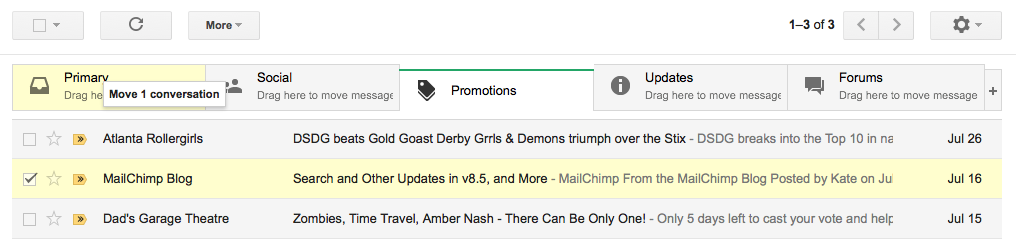
Drag and Drop From Gmail Promotions Tab to Primary
The easiest way to move an email in your inbox is to left-click and hold on the email to drag it from the Promotions tab over to the Primary tab.
Releasing the mouse drops the email into the newly selected tab. Once dropped, Gmail displays a yellow box asking if you want to make this change permanent.Yes to ensure that all messages with the same from address will appear in the Primary tab going forward.
You somehow have to tell your subscribers to do this RIGHT AWAY – when they first subscribe – otherwise every follow-up email will show up in their ‘promotions tab’
Option #2: Use A Custom Professional Mail Delivery Service
All email marketing software falls into two categories. The first category is ‘opt-in’ – meaning that you pay based on how many subscribers you have. The second category is ‘professional’ – meaning that you pay for the delivery regardless of whether someone opted in or not. These are the services the ‘list brokers’ use. They cost more – on average around a penny per email with a minimum of 10,000. They don’t care where you got your list from – whether you bought it – it was filled out from postcards, thank you cards or you simply generated it from thin air – as long as you’re in compliance with the law they’ll send your mail for you. In my experience these emails can be made to ‘bypass’ the Gmail Promotions wall.
If you use one of these services, you have the option of customizing the footer where the ‘unsubscribe’ message lives. This is the ‘tip off’ Gmail uses to determine if your email is promotional or not.
Instead of of the word ‘unsubscribe’ – put in different language that still provides the same function. We use a very cool mailing program for this purpose. It delivers mail on a price per email delivered basis vs. a ‘subscriber’ basis. It is not an autoresponder. Instead it is a email newsletter system. This system works great because you can customize every feature – including the ‘unsubscribe’ language so it shows up in the INBOX every time.
As we move forward in the world of Gmail promotions, marketers will be forced to adapt their strategy. Most of the articles I’ve read are trying to educate users to actually open their Gmail promotions tab – many defend that this is the right place for your newsletter… well – the promotions tab also has all the ads and promotions from Gmail itself.
Most people won’t click the ‘Gmail promotions tab – on a day-to-day basis…or even if they do – your newsletter will be buried in among the ‘noise’
Above The Noise – App
I’m working with some amazing marketers that have created an ‘app’ which I’ll be sharing with all my members very shortly – it’s called ‘Above The Noise’ – with it – you’ll be able to receive updates – news and information that you won’t receive any other way and you won’t need to use your email – you can get the updates on your computer, tablet or phone.